E-Agronomy*
*This configuration is a specialized industry add-on to the basic configurations: BPM-Enterprise or BPM-Corporation.
The E-Agronomy configuration contains all the main sections for tracking business processes related to grain crop cultivation in agriculture. It facilitates remote interaction between all structural divisions and their employees involved in business processes (without the need for in-person meetings in one place or at the same time).
It provides a unified environment for generating, collecting, using, analyzing, modifying, monitoring, and managing all information flows to achieve goals and the desired results for the enterprise as a whole.
Main sections of the E-Agronomy CRM and BPM system from IJI IT GROUP
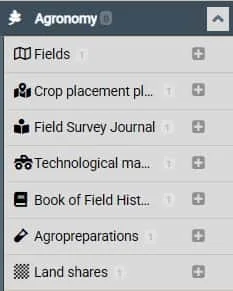
• Fields – a database of all fields/field sections managed by an agricultural enterprise or holding company
• Crop placement plan – information on the placement of agricultural crops on the farm's fields in the current period, with a history by year. Information on each field/field section.
• Field survey log – all necessary information related to field survey results. Information on each field/field section.
• Field process maps – planned, ongoing, and completed technological operations related to sowing, growing, and harvesting for each field
• Field history book – a complete set of all indicators and parameters for each field for all periods of its use
• Agrochemicals – a database of agrochemicals used by the agricultural enterprise for field cultivation
• Land shares – a database of shares and their owners, linked to a specific field and a set of key information for each share.
Advantages of the E-Agronomy BPM system from IJI IT GROUP
1. Centralization of all production information
A single resource for generating, storing, and retrieving all information related to business processes, the economic activities of the enterprise, and each individual employee.
A tool for making correct and efficient management decisions.
2. Ease of use
Navigation through the system is simple and intuitive. The basic setup is adapted to accepted industry terminology. All system elements contain comments and hints. Any user can find answers to their questions or learn the entire business process from scratch.
3. Elimination of double entry
Information once entered into the system does not require re-entry in other forms. It is automatically pulled into the required fields from the system database.
4. Speed of access to essential production information
Various system deployment options (cloud, local server) allow immediate access to the necessary information (with internet access). No additional downloading or installation is required on user devices.
5. Information access channels
Any device with internet access (personal computer, laptop, tablet, smartphone). The system is adapted and supports various information access formats depending on the device.
6. Blockchain technology
All information in the system is interconnected. The entire chain of events, connections, actions, results, participants, etc. can be quickly and easily found and studied.
7. Flexibility in customization to changing conditions
Organized on the "constructor" principle. Allows users to independently add any new entity, define its place in the system, build a new business process, or modify an existing one, both for all users and individually. Without the involvement of programmers.
8. Speed of adaptation to changing conditions
Changes are made in minutes. In a language understandable to anyone (no programming skills required).
9. No costs for changing settings
The constructor system, written in human-readable language, without the involvement of programmers, requires no costs for changing settings, as it can be customized by any user in minutes.
10. API
Application programming interface (API) is available for both receiving data from other services and transmitting it to other programs. Allows you to work in a unified, user-friendly environment with access to information from applications from other developers.
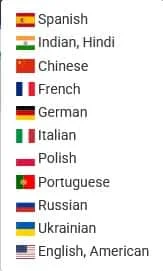
11. Multilingualism
By default, the system interface supports 11 languages, spoken by more than half the world's population. This number can be expanded if needed.
12. Security
Data transmission over communication channels is encrypted. Access to the system is limited to personal access codes. A digital footprint is the identification of each user in the system. Access to system information is available both at the individual user level and through group policies. Group access to information can be organized at the record, field, or element level.
User Convenience
1. Reminders – the ability to set a reminder for any entry in the system before an event, task, etc.
2. Overdue – automatic monitoring of entries for compliance with the date, time, and status. If not, a list of overdue tasks is generated.
3. Intra-system messenger – the ability to conduct personal or group correspondence within any entry in the system.
4. Telegram notifications – the ability to receive automatic Telegram notifications about new entries or any changes to existing ones (without logging in to the system).
5. More information on the screen – the ability to collapse the left menu, increasing the working area of the central part; the ability to split the screen into four parts: the left menu, lists of entries from other categories, a list of entries from the current category, and viewing the contents of the selected entry.
6. Various display modes – entries with the date and time can be viewed in the "Calendar" view; entries in the form of a tabular register (log); Adaptation of post display to various mobile devices.
7. Quick access menu – each user can create a customized menu for quick access to frequently used categories and subcategories.
8. Custom interface design – each user can customize the system interface: font color, background color, desktop wallpaper, notification sounds, etc.
More detailed information on each category of the E-Agronomy configuration from IJI IT GROUP
Fields
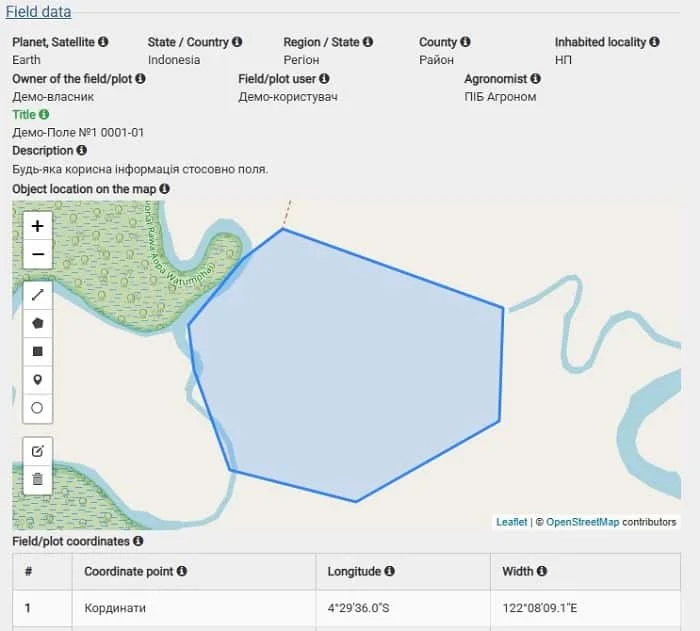
The "Field" form allows you to collect information about:
Owner; User; Agronomist
Field location
Mark the field on the map
Specify its coordinates
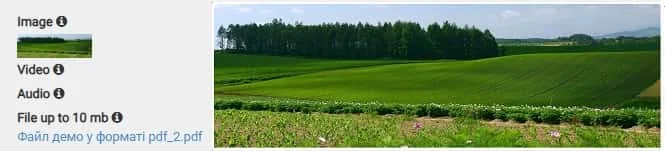
Upload any media files (images, video, audio, documentation, etc.)
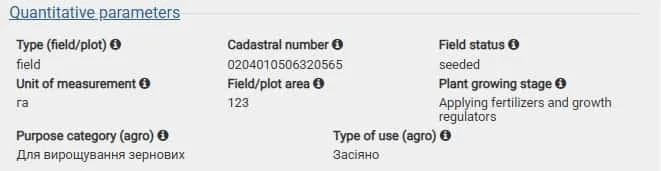
Specify quantitative field parameters
Specify qualitative soil parameters
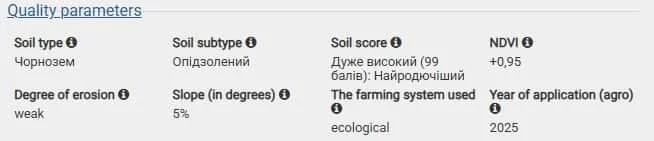
Describe soil protection measures
And any other necessary information.
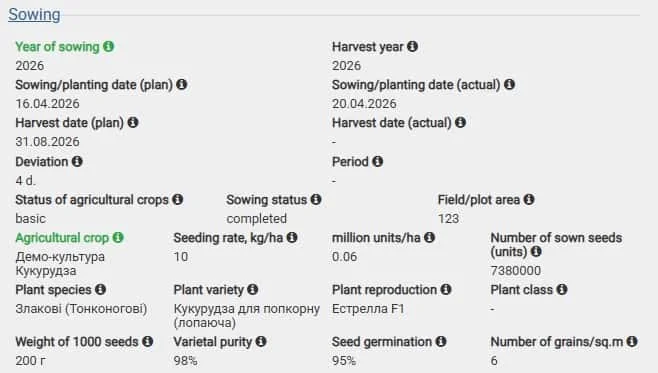
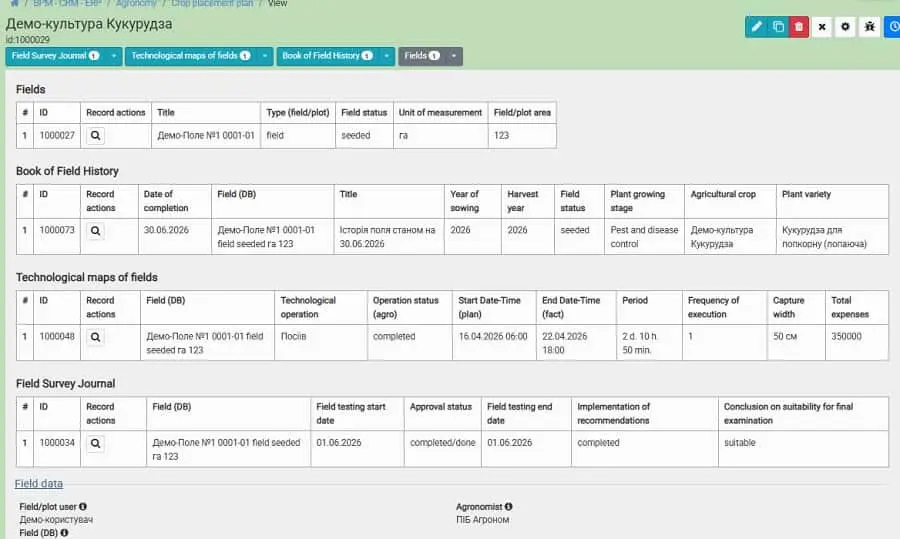
Crop placement plan
The "Crop placement plan" form allows you to collect information about:
Field where the crop is planned to be planted
Predecessor (field crop rotation)
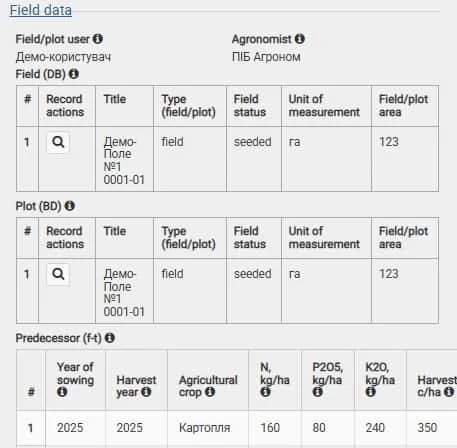
All technical parameters related to sowing
Upload any media files (images, video, audio, documentation, etc.)
Financial information on expenses for the placement plan.

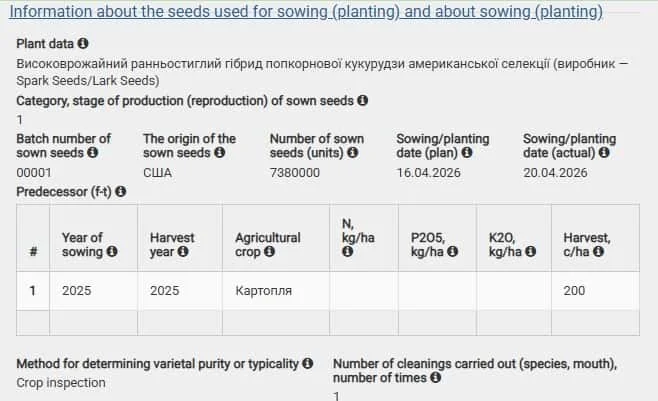
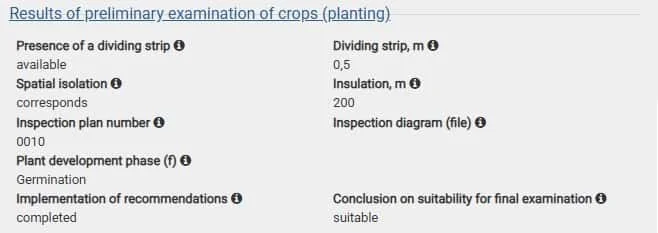
Field Survey Log
The "Field Survey" form allows you to collect the following information:
The field being surveyed
The field user and their contact information
Upload any media files (images, video, audio, documentation, etc.)
Seeds used for sowing and information about the sowing itself
Preliminary survey results
Final survey results
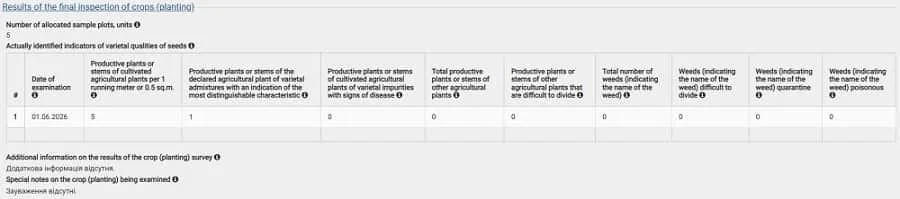
Special comments on the survey
And any other necessary information.
Field Process Maps
The "Field Process Map" form allows you to collect the following information:
The field where the process operation is to be performed
Upload any media files (images, video, audio, documentation, etc.)
Favorable and unfavorable weather conditions for the process operation
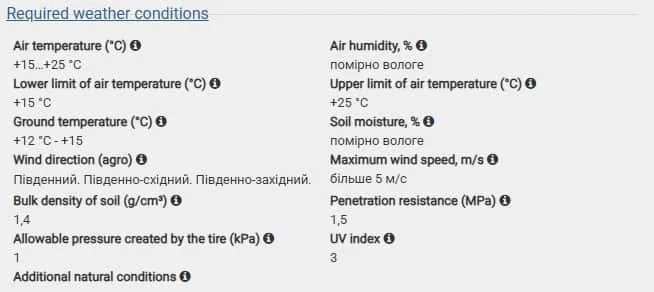
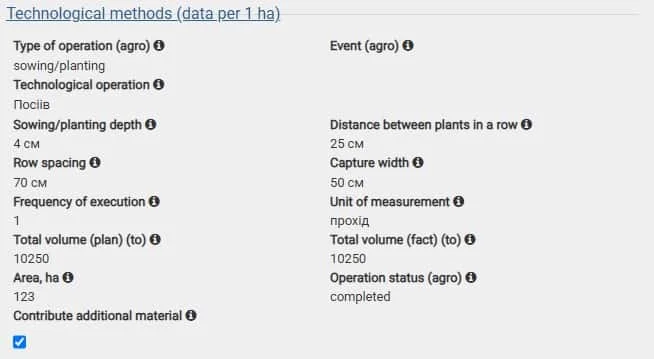
Describe all parameters of the process techniques to be performed
Describe the composition and quantity of all equipment required to perform the process operation
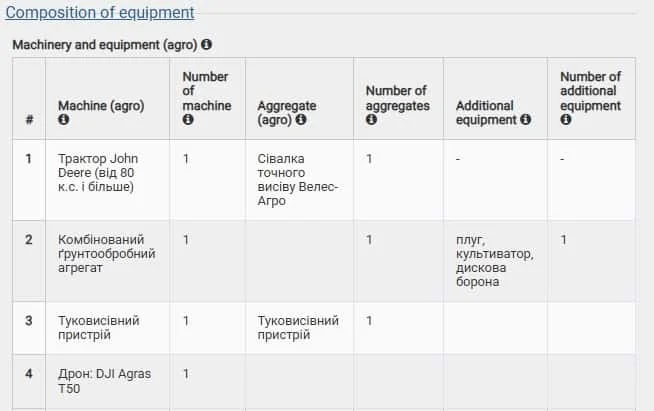
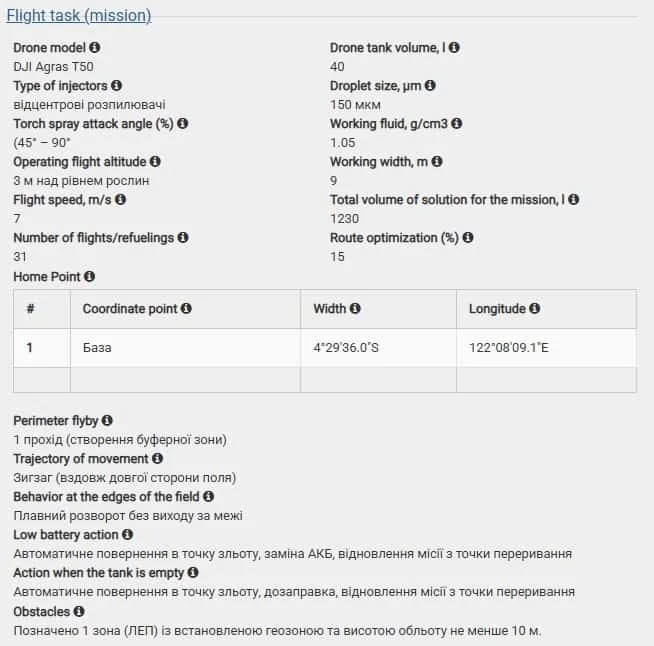
When using agricultural drones, create a complete flight assignment for the mission
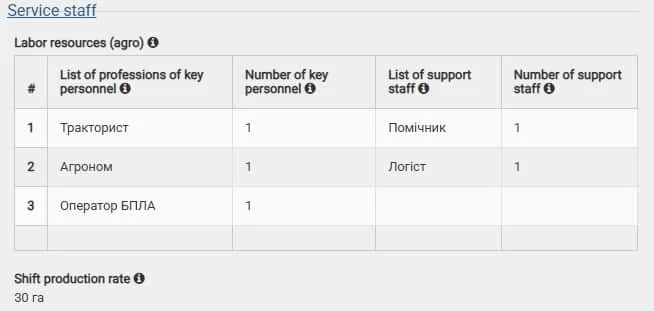
Record all maintenance personnel and the production rate per shift
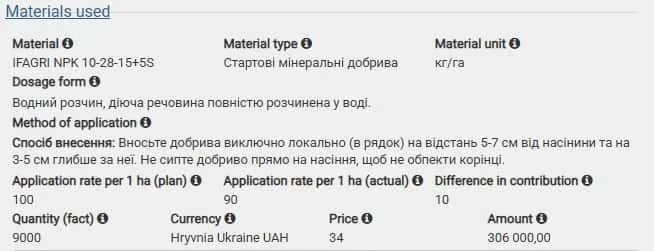
Describe all materials to be used in performing the process operation
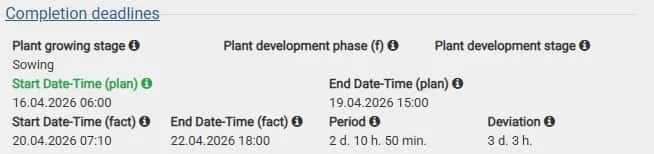
Record the planned and actual deadlines for the operation. Calculate the completion period and schedule deviations
Budget. Financial information on planned and actual expenses. Calculate cost overruns or savings.

And any other necessary information.
Field History Book
The "Field History" form allows you to collect all field information for all periods, broken down by year/years of use, across a very large number of parameters and indicators (over 100):
Field, its characteristics, and the period for which the records are collected
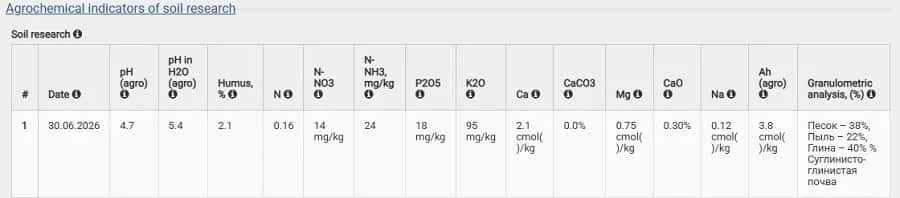
Agrochemical parameters of soil testing
Crop(s) information

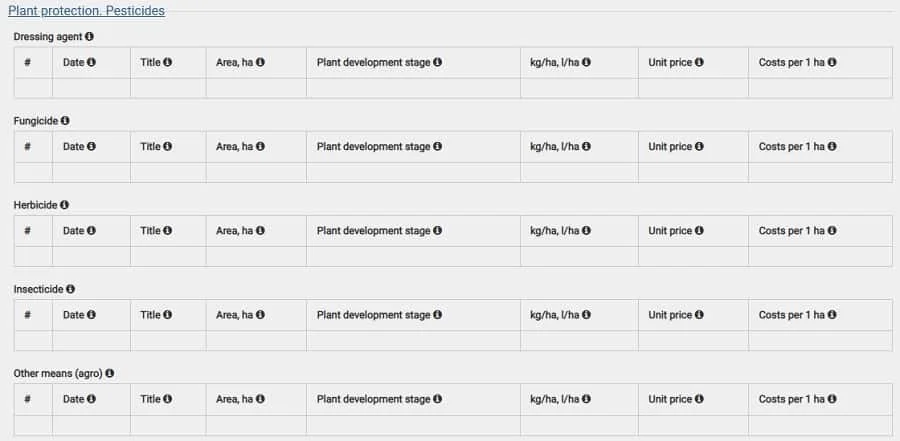
Plant protection. Pesticides
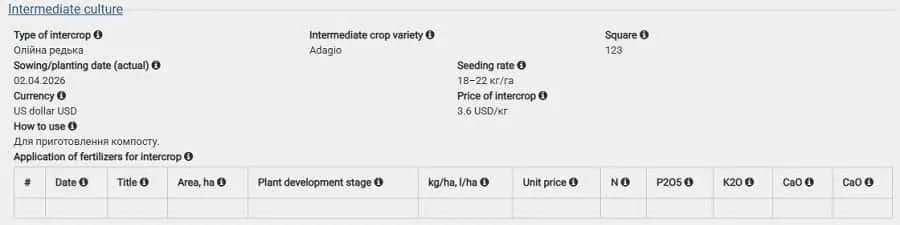
Intermediate crop
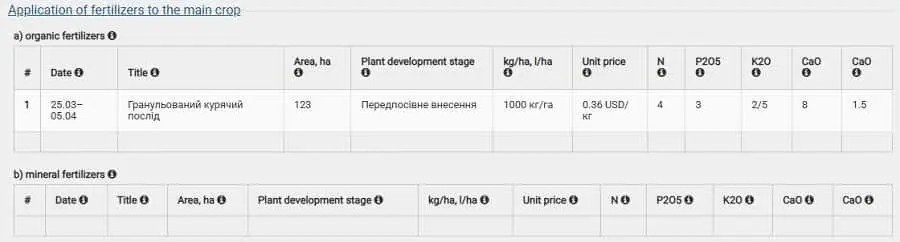
Use of fertilizers for the main crop
Yield and quality of the crop
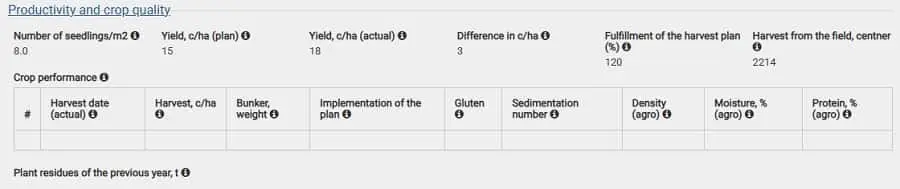
Crop use
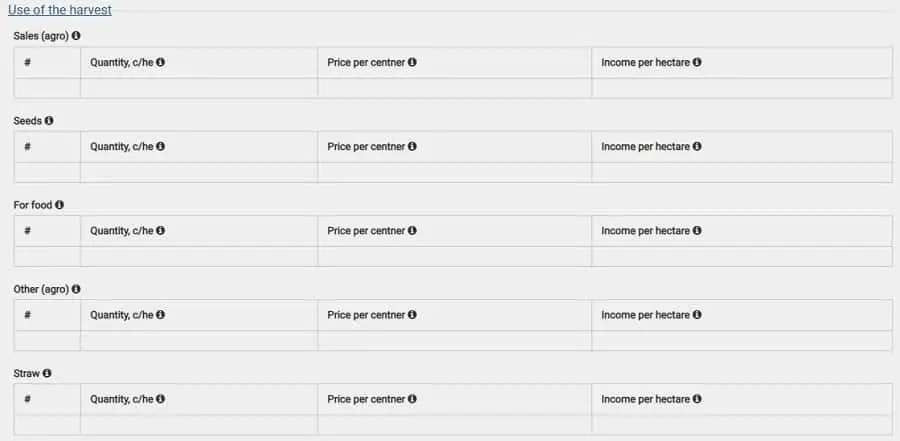
Detailed quantitative composition of the crop, including financial indicators

Phenological observations
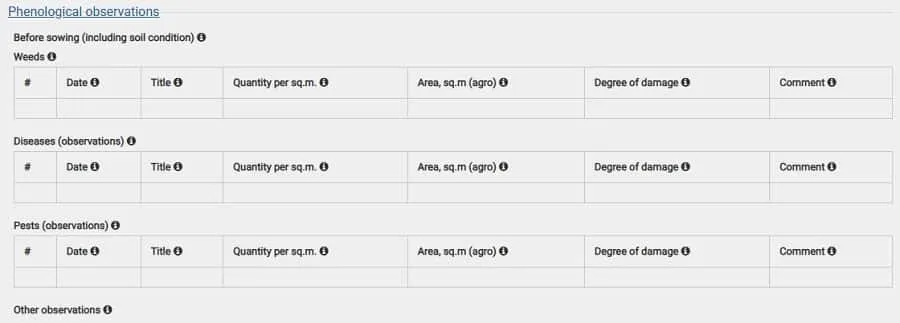
Recording of stages and phases of plant development during the period

Technical techniques used

Nutrient balance accounting
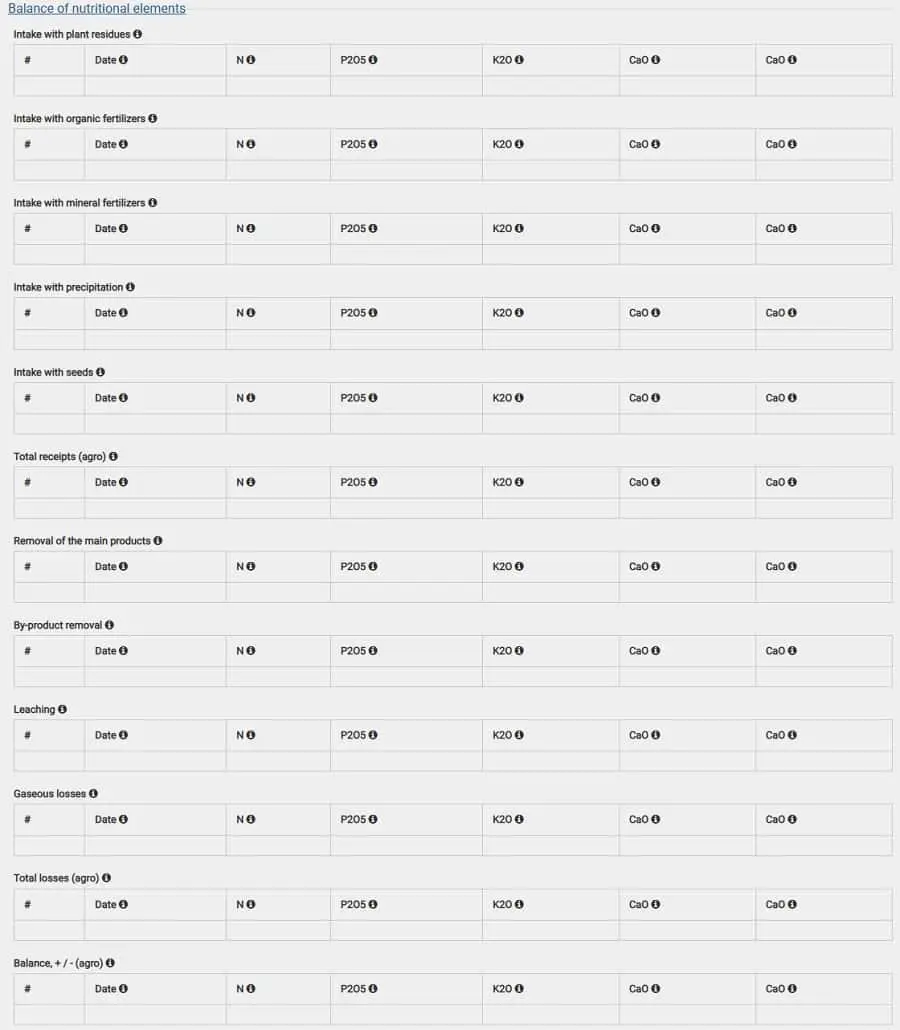
And any other necessary information.
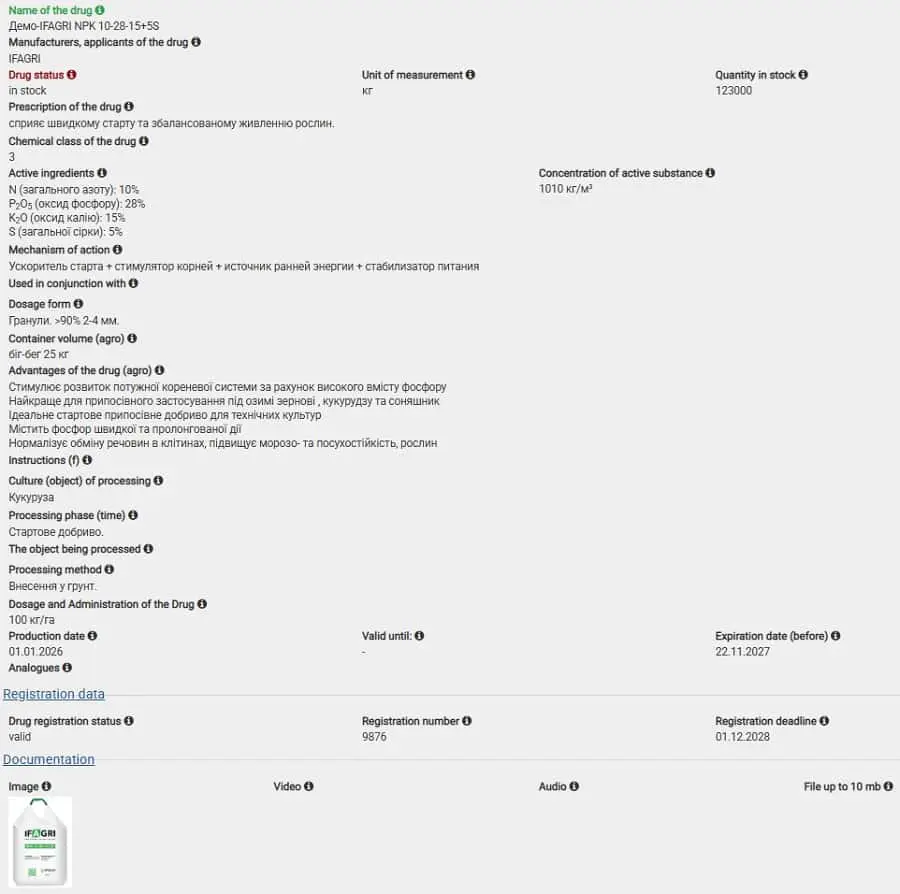
Agrochemicals
The "Agrochemicals" form allows you to collect information:
About the product and its manufacturer
Purpose of the product
Its quantity and status. Expiry date
Active ingredients and their concentration
Mechanism of action
Indicate container volume and formulation
Describe the benefits of the product
Indicate which crops are intended for use. Treatment phase
Object against which the product is effective
Use standards
Official registration. Expiry date
Upload any media files (image, video, audio, documentation, etc.)
Land shares
The "Land share" form allows you to collect information about:
Land share information. Cadastral number. Its location in the field.
Indicate the exact coordinates.
Documentation. Title deed. Agreement for the right of use. Validity period. Current status.
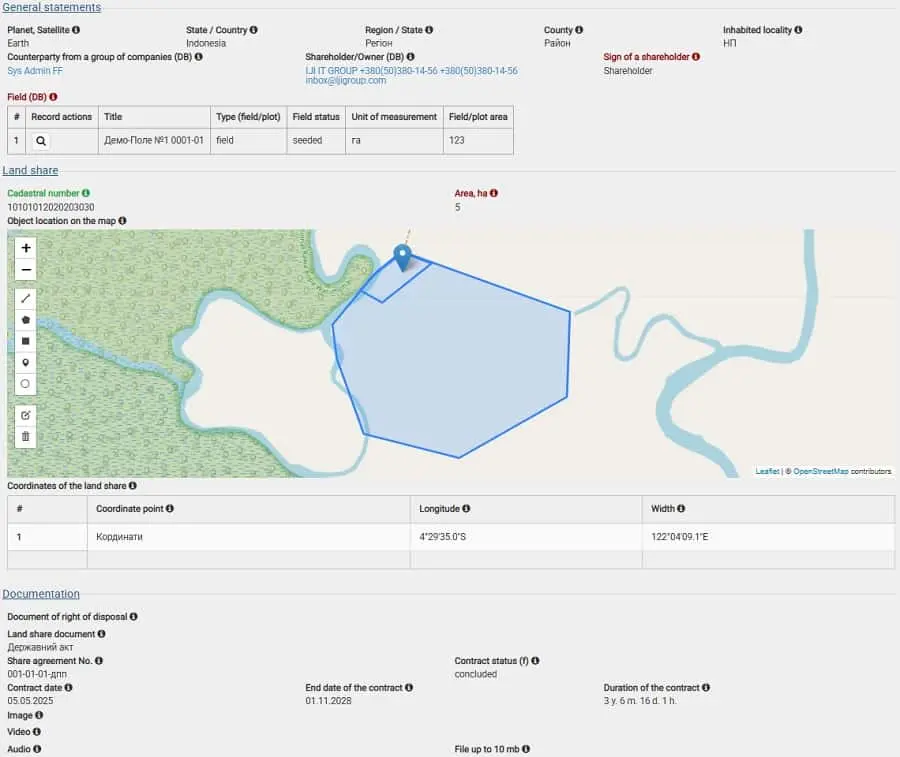
Upload any media files (image, video, audio, documentation, etc.)
And any other necessary information.
Interrelations
Any record in the system is linked to other thematic records in other subcategories.
Through any entry, you can quickly see the relationships and navigate to the necessary information on the topic or question being researched.
Компанія IJI IT GROUP не тільки розробила CRM-систему, а і провела тренінги для персоналу, підготувала Інструкції, надала інформаційну підтримку.
Ми получили полный комплекс услуг, связанный с созданием веб-сайта "с нуля".
Рекомендуємо компанію IJI IT GROUP як виконавця робіт, пов’язаних з розробкою і модернізацією сайтів.
IJI IT GROUP LLC
Phones:
Ukraine
+380 (63) 205-84-81
+380 (50) 380-14-56
E-mail: inbox@ijigroup.com
More...
IJI IT GROUP © since 2011 All rights reserved. When using the site materials reference to the source is required